


































Check Zombie or Not
Check Zombie or Not - Play Online
Stand at the checkpoint. Survivors shuffle forward. Your scanner hums. Hidden bites, fever spots, twitching limbs—every symptom matters. Send them to camp, lock them in quarantine, or eliminate the threat before infection spreads. One mistake wipes out everyone. Check Zombie or Not drops you into a post-outbreak inspection zone where snap decisions separate the living from the infected.
How to Play Check Zombie or Not
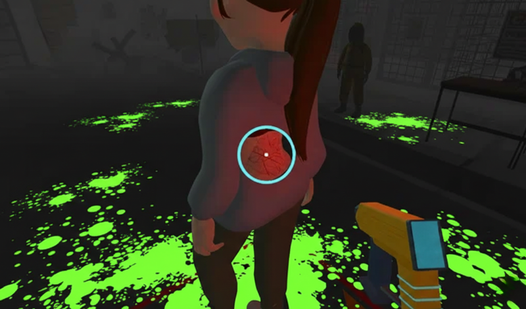
Inspect arriving survivors for zombie infection. Rotate each person with AD or arrow keys, drag your cursor to pan the camera, and equip the scanner with E. Hover over skin, clothing, and exposed areas—glowing red symbols mark infection. Press 1 to approve safe passage to camp, 2 to isolate suspicious cases in quarantine, or 3 to eliminate confirmed threats. Teleport between zones with Z and X. Miss a bite? The camp dies. Kill an innocent? Your conscience takes the hit.
Scanning and Symptom Detection
Equip the thermal scanner and sweep across arms, necks, backs, torsos. Infected tissue glows crimson under the reticle. Early symptoms hide under sleeves or behind hair—rotate the character fully before deciding. Some survivors carry pets or backpacks that obscure bite marks. Right-click to use fists if a confirmed zombie lunges. Each day escalates: more arrivals, faster decisions, layered symptoms that evolve mid-scan.
Progression and Zone Management
Unlock new tools after consecutive correct calls. Disinfectant treats borderline cases. Weapons handle surprise attacks when infected survivors turn violent at the gate. Tab switches your cursor mode for faster item interaction. Quarantine fills up—balance isolation capacity against throughput. Reaching the bunker requires surviving multiple waves without catastrophic errors. Survival games fans recognize the resource-and-consequence tension baked into every choice.
Strategy and Pro Tips
Always check behind ears and collar areas first—bites cluster near the neck. If a survivor fidgets or avoids eye contact, scan twice. Quarantine anyone with ambiguous symptoms when camp capacity is high; better safe than sorry. Use Z to jump back and verify quarantine cases before final judgment. Watch the clock—hesitation kills as much as wrong calls. Upgrade scanner range early to catch hidden infection markers on clothed bodies. Balance speed with thoroughness: three fast correct scans beat one slow perfect check when the queue stacks up.
Key Features
- Real-Time Symptom Scanning: Rotate survivors in 3D space and use a handheld thermal scanner to reveal glowing infection symbols on skin, with symptoms hidden under clothing or hair.
- Low-Poly Quarantine Aesthetic: Mobile-compatible Unity shaders render stylized checkpoints, hazmat guards, blood-stained floors, and volumetric fog for an atmospheric inspection zone.
- Three-Choice Judgment System: Send survivors to camp (1), quarantine (2), or elimination (3) based on scan results, with each decision impacting camp survival and your progression toward the bunker.
- Tool Progression and Teleportation: Unlock disinfectant, melee weapons, and scanner upgrades after successful inspections; teleport instantly between quarantine and inspection zones using Z and X hotkeys.
Who is Check Zombie or Not for?
Perfect for players who crave tense decision loops under time pressure. If you enjoyed Infection Bio War and its strategic outbreak management, Check Zombie or Not delivers the same infection-stage analysis from a first-person checkpoint perspective. Fans of puzzle games that demand pattern recognition and simulation games with moral weight will appreciate the quick-fire judgment calls. Mobile-first users get instant browser access on desktop, Android, and iOS—no downloads, just click and play. After mastering the scanner, defend the camp directly in Zombie Last Survivor where roguelike combat and resource management test your survival skills beyond the checkpoint.
Developer
Check Zombie or Not was developed by Aviana Games. The game blends first-person inspection mechanics with post-apocalyptic survival themes, delivering a streamlined quarantine simulator playable instantly in any browser across desktop and mobile platforms.
Controls
- Cursor / Swipe Right (Mobile): Rotate camera view
- AD / Arrow Keys / Swipe Left (Mobile): Rotate character left or right
- E: Equip selected tool
- Q: Put away current tool
- Right-Click: Use fists for self-defense
- 1: Send survivor to camp
- 2: Send survivor to quarantine
- 3: Eliminate survivor
- Z: Teleport to quarantine zone
- X: Teleport to inspection zone
- Tab: Switch cursor mode
FAQ
How do I detect hidden infection symptoms?
Equip the scanner with E, then rotate the survivor completely using AD or arrow keys. Hover the scanner over all exposed skin—neck, arms, back, and face. Glowing red marks indicate infection. Check under hair, behind ears, and beneath clothing edges where bites often hide. Some symptoms appear faint at first and intensify under sustained scan focus.
What happens if I send an infected person to camp?
Sending an infected survivor to camp triggers an outbreak. The infection spreads among healthy survivors, reducing your camp population and lowering your chances of reaching the bunker. Multiple wrong calls can result in total camp collapse and game over. Always double-check scan results before pressing 1.
Can I play Check Zombie or Not on mobile devices?
Yes. Check Zombie or Not runs instantly on Android and iOS through your browser—no download required. Swipe the right side of the screen to rotate the camera and the left side to turn the survivor. All inspection and judgment controls adapt to touchscreen input for smooth mobile gameplay.
How do quarantine and elimination decisions differ?
Quarantine (key 2) isolates survivors with ambiguous or early symptoms for observation, preserving innocents while managing risk. Elimination (key 3) removes confirmed infected threats permanently but kills the person. Use quarantine when scan results are borderline, and elimination only when glowing infection markers are unmistakable. Balance capacity and certainty to maximize survival.
What tools unlock as I progress?
Consecutive correct inspections unlock disinfectant for treating borderline cases, upgraded scanners with extended range to detect hidden symptoms faster, and melee weapons for self-defense when infected survivors turn aggressive at the checkpoint. Tool progression rewards accuracy and helps you handle higher-risk waves as difficulty escalates each day.